MacBook Pro with M5 Max Review: This Is Better Than Your Desktop
Since it introduced its own silicon, it feels like every time we review an Apple computer, we make some grandiose statement about how much better it is than before, or how it’s the best. That much praise can make it hard to express the meaning of this achievement, as it can just feel like listening to a broken record.
But I’m at it again: this is the best video editing computer available. Note, I did not say “best video editing laptop available.” I said, “best video editing computer available.” That is a very important distinction.
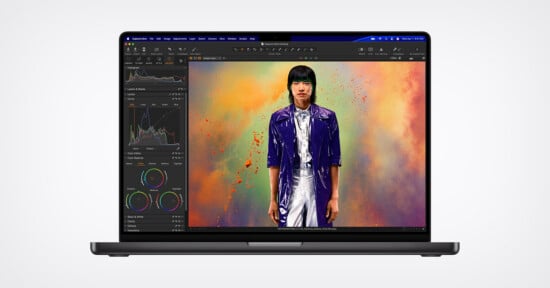
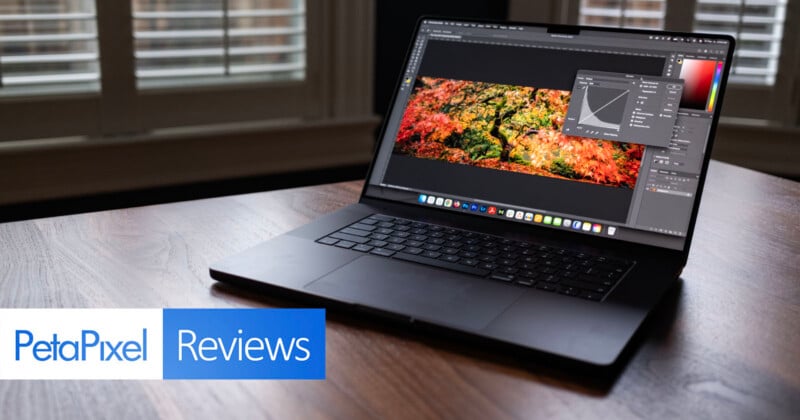
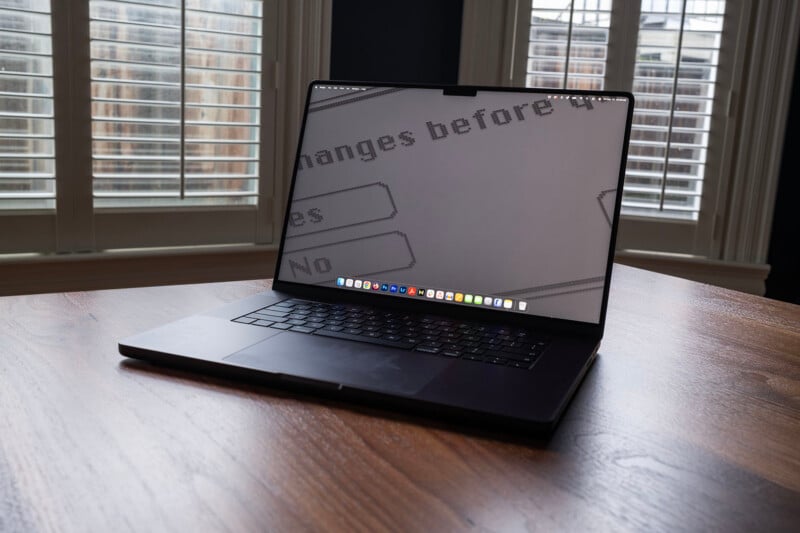
Before we get into the review, it’s worth keeping in mind what exactly we are evaluating here, as there are multiple configurations of the M5 Max MacBook Pro. My review unit is the nearly top-end 16-inch option: M5 Max with an 18-core CPU and 40-core GPU, 128GB of unified memory, and 4TB of SSD storage. It also has the Nano-texture display, bringing the total to a cool $6,149. It’s worth noting that you can get an 8TB version that adds $1,200 more to that price.
This is a powerful computer, not an affordable one.
MacBook Pro with M5 Max Review: Design and Build Quality
This is going to be quick, because Apple didn’t change much when it comes to its design and build. In fact, Apple hasn’t changed much for several years now, and everything we said last October applies today. The original Apple silicon MacBook Pro from several years ago doesn’t look all that different from the M5 Max model sitting on my desk right now. MagSafe, Thunderbolt/USB-C ports, headphone jack, large trackpad, excellent keyboard, nice display.
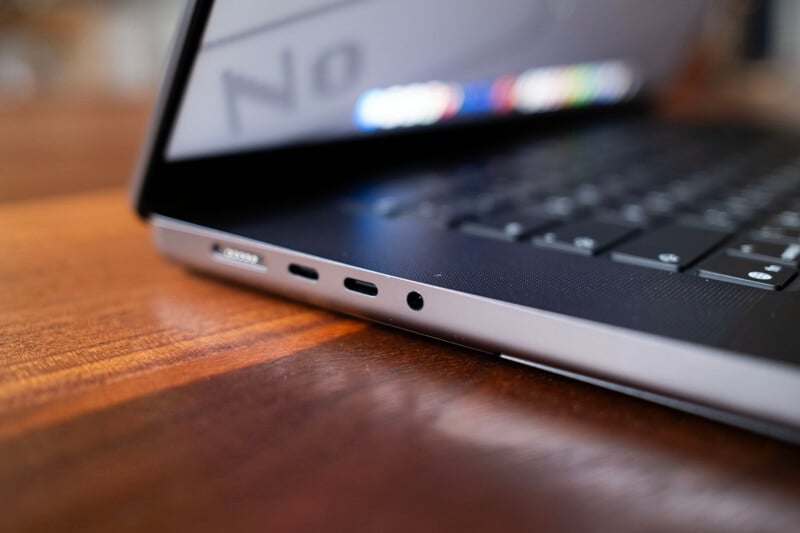
I will call out that it’s nice to see three Thunderbolt 5 ports. That means photographers and editors won’t need to trick out their computer with the highest capacity internal SSD, since access to fast external storage is possible. If you’ve got a nice external SSD, you can probably go with the more affordable, lower capacity 2TB SSD option from Apple.
As mentioned, just as was the case with our review unit of the Studio Display XDR, this unit has Apple’s Nano-texture display, which, as we’ve demonstrated multiple times, is outstanding at reducing the effect of glare. This does have the side-effect of reduced contrast in some situations, but I don’t think I can go back to the standard display after using Nano-texture. Being able to work effectively in any environment, regardless of lighting conditions, is just so freeing, especially in something portable like a laptop.
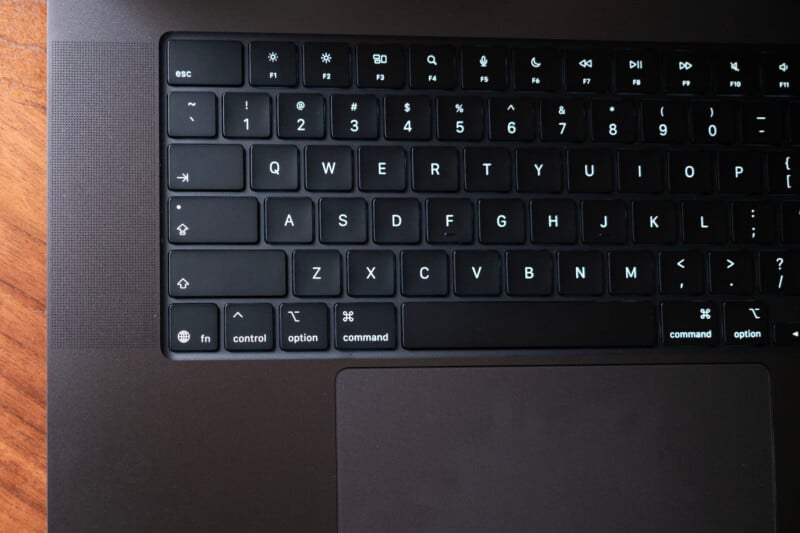
I said Apple “didn’t change much” because there is one slight change that you probably won’t notice unless it’s pointed out to you. Apple removed the words caps lock, shift, tab, delete, and return from those keys and replaced them with small icons. I can’t say it has changed my life in any way whatsoever, but I guess the keyboard looks a little cleaner now.
I haven’t really mentioned this in past reviews, but after significant travel in the last year, I feel compelled to say that I notice the weight. The MacBook Pro weighs four pounds, 12 ounces (that’s about 2,155 grams, or just a bit more than a Noct). I have tripods that weigh less than this computer, and I definitely notice it in my backpack. That’s the price of power and size, and one I’ve been willing to pay, but I do wish it were lighter.

Battery life, the performance of the keyboard and trackpad, and other aspects of the hardware design are unchanged from last year’s M5 MacBook Pro, and in testing, I have seen nothing to indicate real-world expectations should differ from what we have already tested. So, make sure you check out Jeremy Gray’s review from October to get a more detailed breakdown of what you can expect from these machines.
Alright, enough of what hasn’t changed, let’s talk about what has changed.
MacBook Pro with M5 Max Review: Performance
The SSD
Starting with the SSD, Apple made a huge claim in its announcement: up to twice as fast as prior models. The exact quote: “The new MacBook Pro delivers up to 2x faster read/write performance compared to the previous generation, reaching speeds of up to 14.5GB/s.”
That’s wild because previous computers were not, by any stretch of the imagination, slow. And while I don’t doubt there was some specific lab test that showcased that 14.5GB/s speed, just as is the case with SSDs and memory cards, real-world performance rarely matches lab test promises. As a result, I went into this test with tempered expectations. As a point of reference, below is what last year’s MacBook Pro with the M5 processor (2TB SSD) tested at:
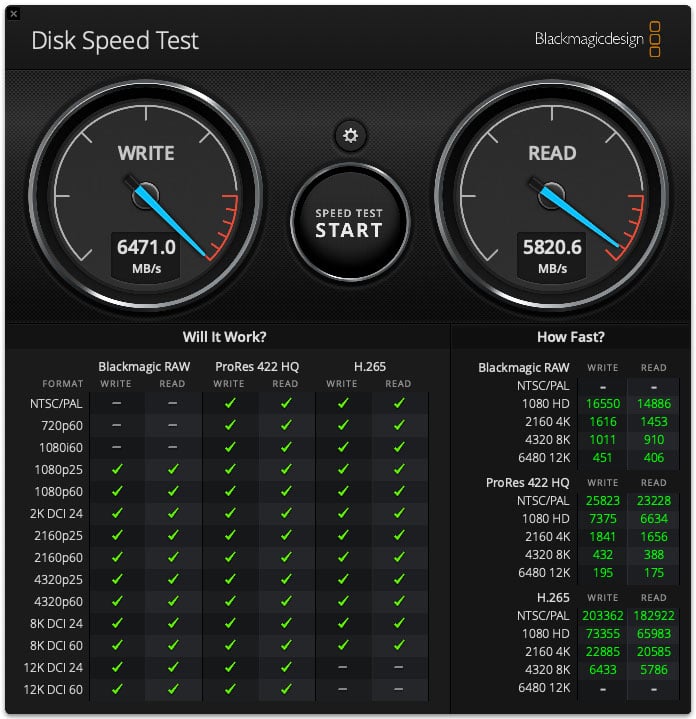
And this is how the MacBook Pro with M5 Max (4TB SSD) did:
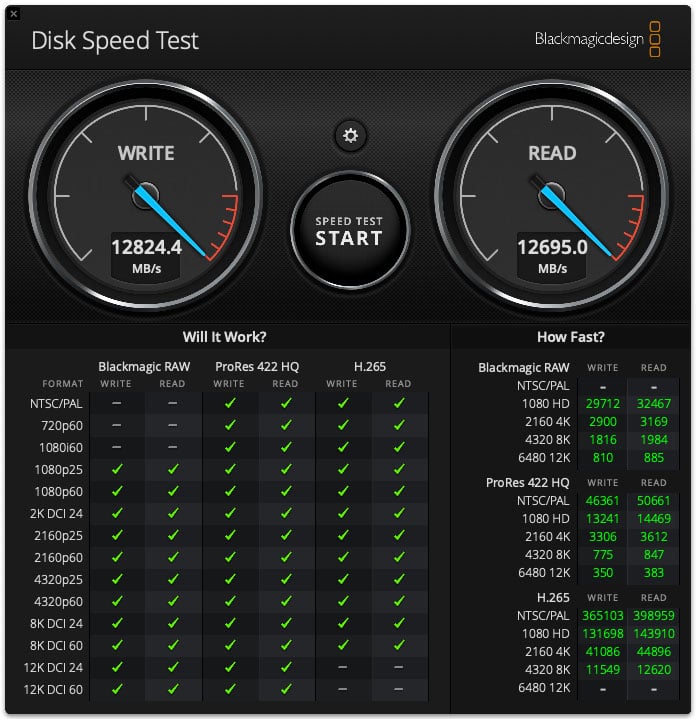
I have never seen anything even close to this fast. In fact, it doesn’t even look like Blackmagic anticipated any disk ever getting to six digits of speed because the numbers are bleeding off the side of the display area — it’s literally off the chart.
Apple is known to work some magic with the combination of hardware and software to get really fast SSD performance. It’s also likely that the company is using PCIe 5.0, but I’m not able to confirm that, as that specification isn’t listed anywhere. I’m not sure what we can point to as a definitive explanation, so all I can say is that Apple didn’t lie when it said to expect twice the speed versus last year’s model. It is, in fact, twice as fast, even if we didn’t quite get to the 14.5GB/s.
The Display
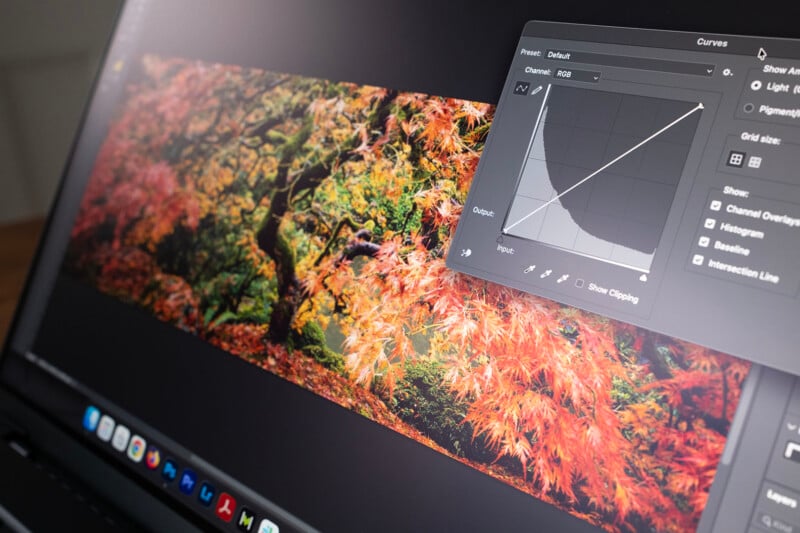
The display might not be different than in previous models, but we haven’t actually measured its performance before, due mainly to issues we were having with our testing software and Apple Silicon. These issues have been resolved, so we can finally put some real numbers behind what we typically have just said “looks good.”
And it does look good — but it tests good too. As a recap, this mini LED display features over 2,500 local dimming zones and has a peak brightness of 1,600 nits in HDR.
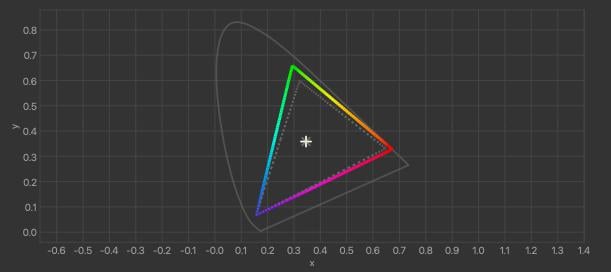
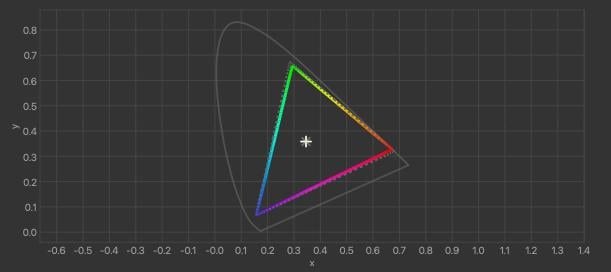
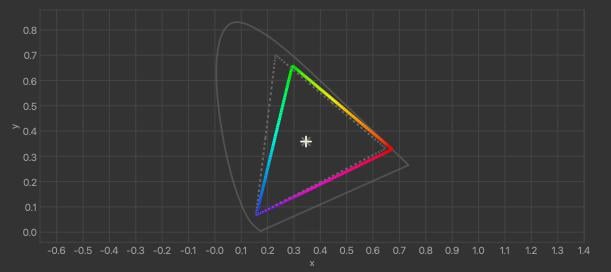
The Nano-texture display I tested has excellent gamut coverage: more than 100% sRGB, 95.4% DCI P3, and 83.8% Adobe RGB with an average Delta E of 0.34. These are spectacularly good numbers (especially that Delta E, which also never exceeded 1.08; anything less than 2 is considered excellent), and are very close to what we found in the Studio Display XDR, although that standalone display gets brighter and is slightly more consistent.
I did notice that if I pushed the MacBook Pro Liquid Retina XDR display beyond about 90% brightness, the greens would get way stronger than the reds and blues. That means if you’re focused on color-critical work, you’ll want to stick at 90% or below, where colors are far better and extremely consistent. The numbers and charts in this section were all gathered from tests performed at 90% brightness, but I can confirm that dropping brightness doesn’t negatively affect the results, as increasing it beyond 90% will.
Next, I tested display uniformity using our standard 9×5 arrangement, and I am happy to report that this is a very consistent panel from edge to edge. Nowhere does it dip below nominal tolerances, even in the corners, with the only slight inconsistency being brightness and maximum Delta E dips in a few squares. However, none of these dips is statistically significant and is unlikely to affect a viewing (or editing) experience.

Because it’s mini LED, the MacBook Pro display has good but not perfect blacks. I think it’s one of the best examples of great deep blacks in a non-OLED monitor, but OLED is still superior. OLED is also better when it comes to halo control, as this display will exhibit a bit of a glow around bright objects on screen set against a dark background, such as brightly lit captions in letterboxed content. It’s not bad by any means, though, and most people won’t notice. The benefit of mini LED is that it has a longer lifespan and it gets brighter, so I’m happy with Apple’s decision here. There is absolutely no bloom either, and no noticeable stutter or judder. Overall, this is an outstanding display.
Benchmark Testing: Adobe Lightroom Classic
On to the real guts of this review: how the M5 Max performs in creative applications.
PetaPixel has switched from manually hand-timed Lightroom Classic benchmarks to Puget Systems’ Lightroom Classic benchmark. This benchmark, which is at version 1.00 and for Lightroom Classic 15.2 at the time of writing, is comprehensively detailed on Puget’s website. Bear in mind that because this benchmark is relatively new, we don’t have as many computers tested in it as we do in our other benchmarks.
The Extended version of this test imports 250 RAW image files from the following four full-frame mirrorless cameras: Canon EOS R5 Mark II, Panasonic Lumix S1R II, Sony a1 II, and Nikon Z8. The test then creates 100 Smart Previews of a repeatable selection of these RAW files, and exports 100 JPEG and 100 DNG images. The benchmark provides a score for the overall performance in Lightroom Classic for each batch of files. However, the full test log also includes timing for each task. PetaPixel has chosen to include the timing results for only the Sony a1 II files in its charts below, since the a1 II has the highest megapixel count of the four cameras included.
Puget’s Extended benchmark also tests Lightroom Classic’s AI features, including Select Sky, Select Subject, Reflection Removal, Denoise, Enhanced Details, and Super Resolution. In many cases, these tests are performed in a fraction of a second, so little differentiation between computers is evident. However, the Denoise and Super Resolution tests take considerably longer, so these are included in the test charts. The overall AI task performance is also captured by a single AI score included in the charts.
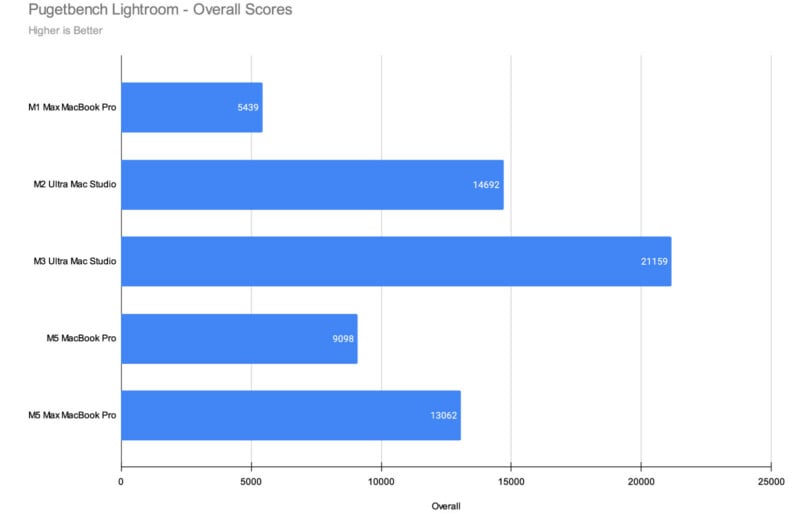
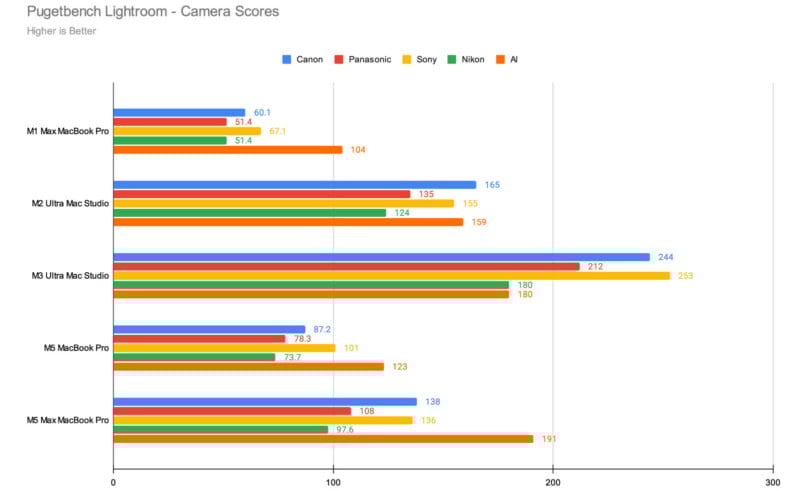
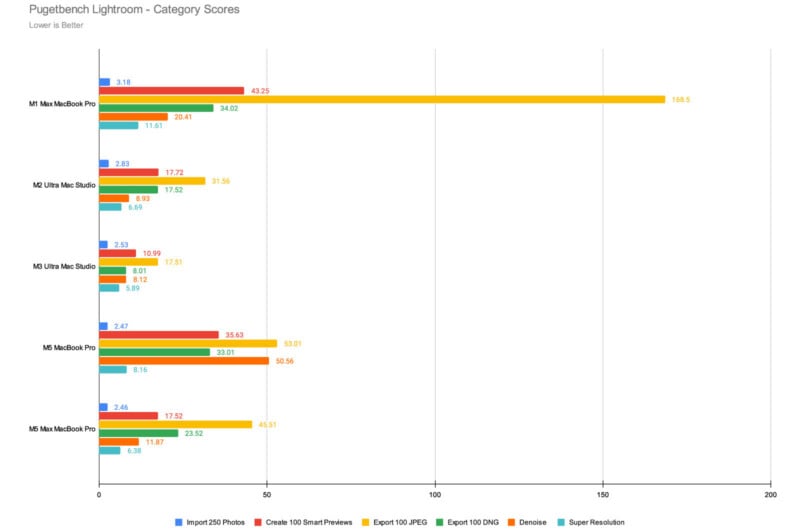
You can consider this test to be us starting with the “bad” news first: the M5 Max is still outclassed by both the M2 Ultra and the M3 Ultra desktop computers, likely because Lightroom relies heavily on the CPU and because it’s not as well optimized as other creative applications. However, it is the best laptop we’ve tested with regard to Lightroom performance, and it’s not too far behind the M2 Ultra.
What I think is the most important comparison is to the M1 Max, where the M5 Max is over twice as fast in Lightroom Classic. The most common buyer of the M5 Max is going to be someone who is looking to upgrade from the M1 era or earlier, and in those cases, speed gains are going to be hugely noticeable.
Benchmark Testing: Adobe Photoshop
Next, we put the M5 Max through Pugetbench’s Photoshop benchmark, and this is where we start to see that this chip has some serious power.
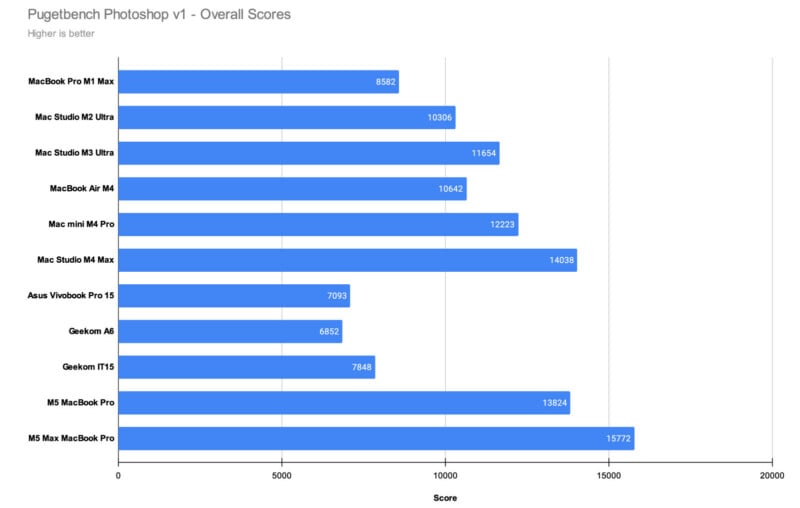
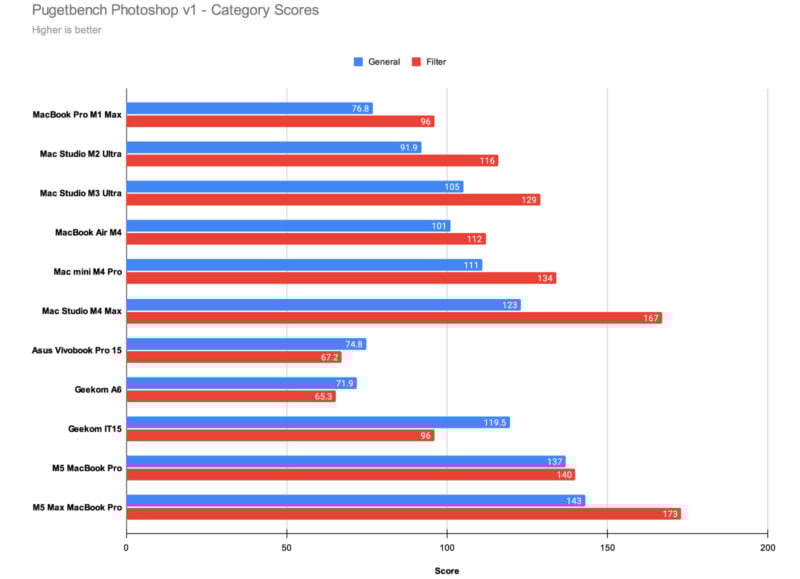
I am blown away by how well the M5 Max performs in this benchmark. It not only outperforms the M5, M4 Pro, and M4 Max, it also soundly crushes both the M2 Ultra and the M3 Ultra. Its Filter and General category scores are also the highest on record, and it’s worth noting that the General category is CPU reliant. Combine that with the M5 Max’s outstanding GPU performance, and we can see why it is the best computer — not just laptop — we have ever tested for Photoshop.
Benchmark Testing: Adobe Premiere Pro
Apple computers are great for working with photos, but we’ve seen a trend over the last few years that shows the real gains are found when looking at video editing performance.
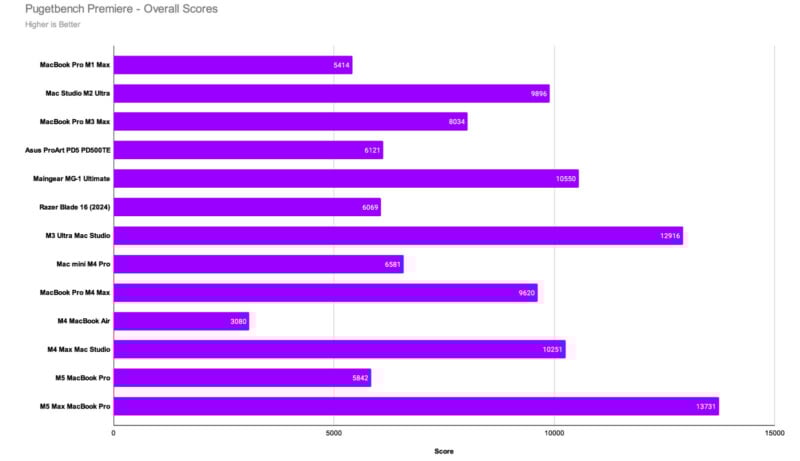
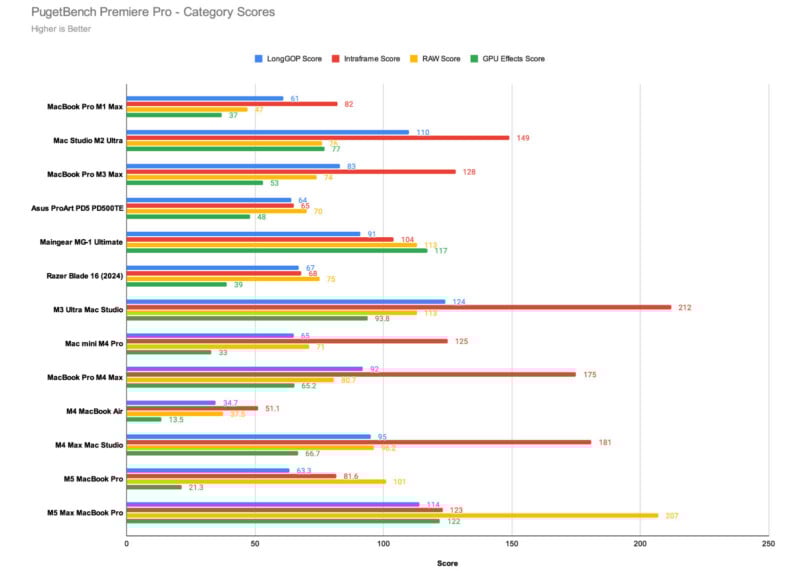
The M5 Max is a lightning bolt when it comes to video editing. This single chip is outperforming the dual chip of the M3 Ultra Mac Studio by almost 1,000 points, driven mainly by what is a spectacular RAW score. Pugetbench tests 4K Canon Cinema RAW Light ST, 4K ArriRAW, 4K Nikon N-RAW, 5K Sony X-OCN, 4K RED, 4K RED R3D 4x Multistream, and 8K RED processing, all of which rely heavily on the GPU. The M5 Max has nearly double the best previous score we’ve ever seen for RAW video processing, making it easily the best rig on the market for this type of video editing. The GPU effects score is also through the roof, highlighting the potency of the M5 Max’s GPU prowess.
If you mainly work with Intraframe, however, the M4 Max, M3 Ultra, and M2 Ultra still score better.
Benchmark Testing: DaVinci Resolve
DaVinci Resolve is an exceptionally well-optimized video editor and is pretty consistently my personal favorite benchmark for looking at a computer’s capability with high-end video editing. Here, the M5 Max performs exceptionally well.
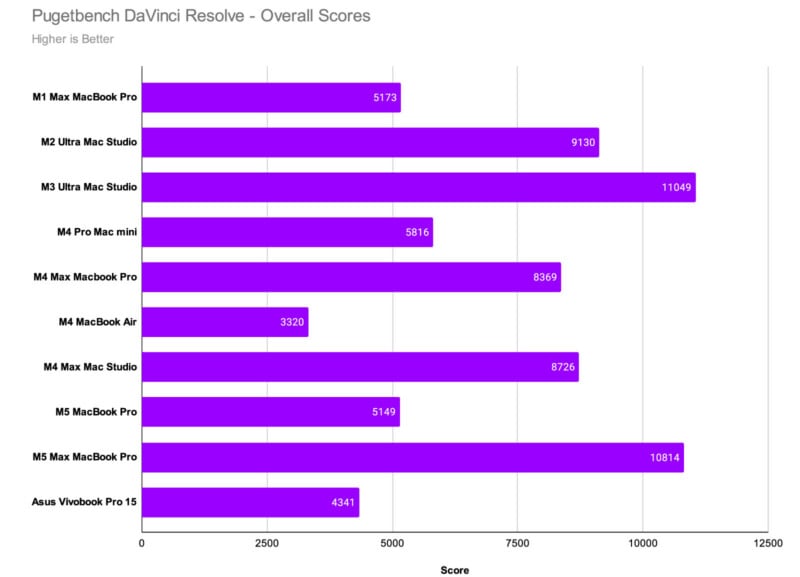
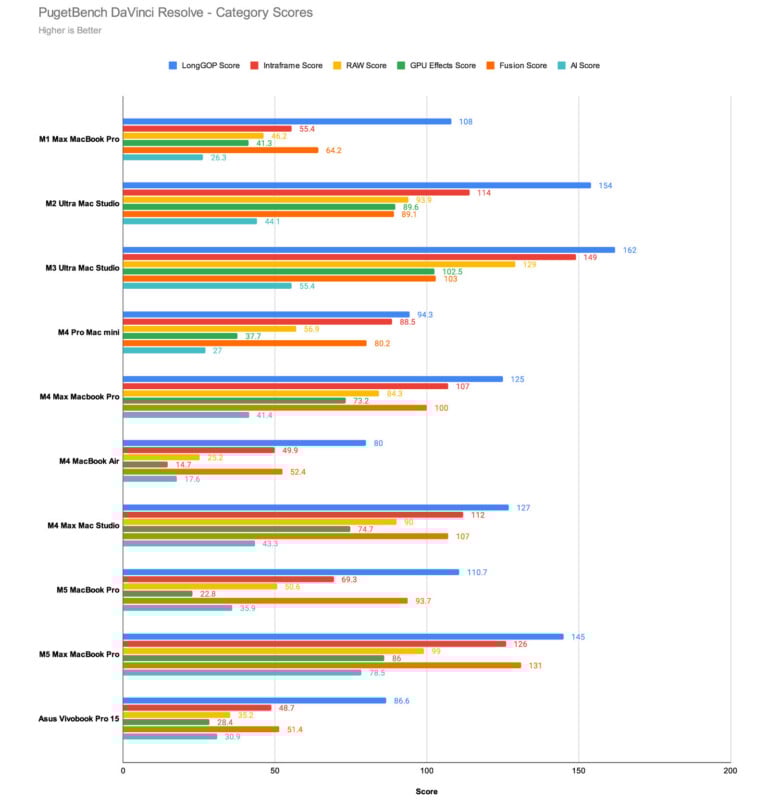
It’s not the most competent machine we’ve ever tested in Resolve, but it’s close. Its Intraframe, Fusion, and AI scores are all better than the M2 Ultra and come very close to the potency of the dual-chip M3 Ultra.
Apple MacBook Pro with M5 Max: Performance Takeaways
Last year, we noted that the M4 Max and M3 Ultra were clearly Apple’s best current offerings for very demanding video editing workflows, but that narrative has shifted a bit. The M3 Ultra’s position at the top is less secure than before, as the M5 Max beats it in Premiere Pro, even though the M3 Ultra is still the better machine in Resolve.
Looking more broadly, the M5 Max makes a strong case as the best overall creative computer available, given its excellent Photoshop scores and very good Lightroom scores. It’s a bit of give and take with this chip, but it does mean you can save some a lot of money with a fully kitted M5 Max Macbook Pro versus a high-end M3 Ultra and not really give up much in performance while making notable gains elsewhere. Getting a chip that’s about as fast with a very good display included as part of the package feels like the better decision right now, especially considering it’s probably only a matter of time before Apple shifts from the M3 Ultra to the M5 Ultra.
At the time of writing this review, the M5 Max is not only more cost-effective, but it’s probably going to retain that value for longer than the more expensive M3 Ultra will. Given how scant the difference is between them, I can’t recommend buying the M3 Ultra right now. The M5 Max is the best creative-focused computer on the market, based on both performance and price.
As I mentioned previously, what really matters to most potential buyers is how this computer compares to older MacBook Pros, specifically those from 2023 and earlier. In those cases, the M5 Max easily showcases its value. If you’re upgrading from the M1, M2, or even M3 generations — any chip from those — you will see noticeable improvements moving to the M5 Max.
Based purely on how it compares to previous generations, I think Apple’s M5 Max is the most impressive chip yet.
Apple MacBook Pro with M5 Max: A Walled Garden Can Be Beautiful
In the title of this review, I said that “this is better than your desktop,” which might be a bit of an overstatement for a small number of you. Yes, if you’ve got a top-end spec Mac Studio with the M3 Ultra, that statement is less definitive. But I know that folks who bought that machine probably didn’t all get it fully tricked out. A majority of people are using older desktop computers, and I’m certain a large number of you are using computers much older than the M3 Ultra. So I stand by that statement with just a slight clarification: for most of you, this computer is better than your desktop — a lot better.
Apple often gets a lot of flak for what is characterized as a “walled garden” approach to both its hardware and software design. I can see how PC enthusiasts, especially, probably look at what Apple does with particular disdain, as they like being able to be in control of their machines. But on the opposite side of that coin, there are clearly benefits to Apple’s approach.
The M-series chip design has resulted in insanely good performance for creative applications. Beyond that, its MacBook Pro line benefits from outstanding efficiency, allowing photo and video editors to maintain this level of performance even when not attached to a wall. Apple seems to recognize that it doesn’t make sense to tie the best performance to being plugged in, which is something PC laptops have yet to be able to do. Those with discrete graphics — and those remain the only ones creative professionals should care about — are very power hungry, and batteries just can’t keep up.
The other problem with PCs is optimization, as there seems to be too much going on in addition to the base Windows to allow PetaPixel to get consistent benchmark results from them. We’ve tried — seriously tried — to review more PC laptops in the last year and we’ve run into nothing but problem after problem. The worst part is that each brand’s issues are different, making it basically impossible for us to work with Pugetbench or the manufacturers to solve them.
Meanwhile, Apple’s ecosystem has been the picture of consistency, giving us great insight into performance over time. The company isn’t perfect — I don’t love Tahoe, for example — but I have to give them credit: these machines do, in fact, just work.
Are There Alternatives?
We still very much like the base M5 MacBook Pro from last year, but if you buy directly from Apple, that means you’re locked to only the 14-inch model. New 16-inch models only come with M5 Pro or M5 Max. Those are great processors, though, and are worthwhile alternatives.
You can still get the M4 Pro in either the 14 or 16-inch size from dealers like B&H, and those are a lot more affordable than the M5 Max model I tested here. If you don’t need every horse in Apple’s stable, those are great options.
On the PC side, we can recommend the Asus ProArt P16 laptop, which offers a similar form factor and overall aesthetic as Apple’s MacBook Pro line. However, the best performing model is about $4,000.
Should You Buy It?
Yes. This is an especially excellent choice for anyone upgrading from the M1, M2, or M3 series processors, but even the M4 line and the baseline M5 from last year are notably outclassed by the M5 Max. This is an exceptional creative editing machine and one of the most impressive computers we have ever seen.